LobsterLauncher sets up OpenClaw in under 5 minutes — no terminal, no config files, no headaches.
We've been there. Here's the difference LobsterLauncher makes.
⏱ Estimated time: 2–4 hours (if you're lucky)
Your AI assistant is running. ⏱ Under 5 minutes.
Six features that turn a complex setup into a 5-minute install.
7 simple steps from download to "Hello, AI." No terminal required.
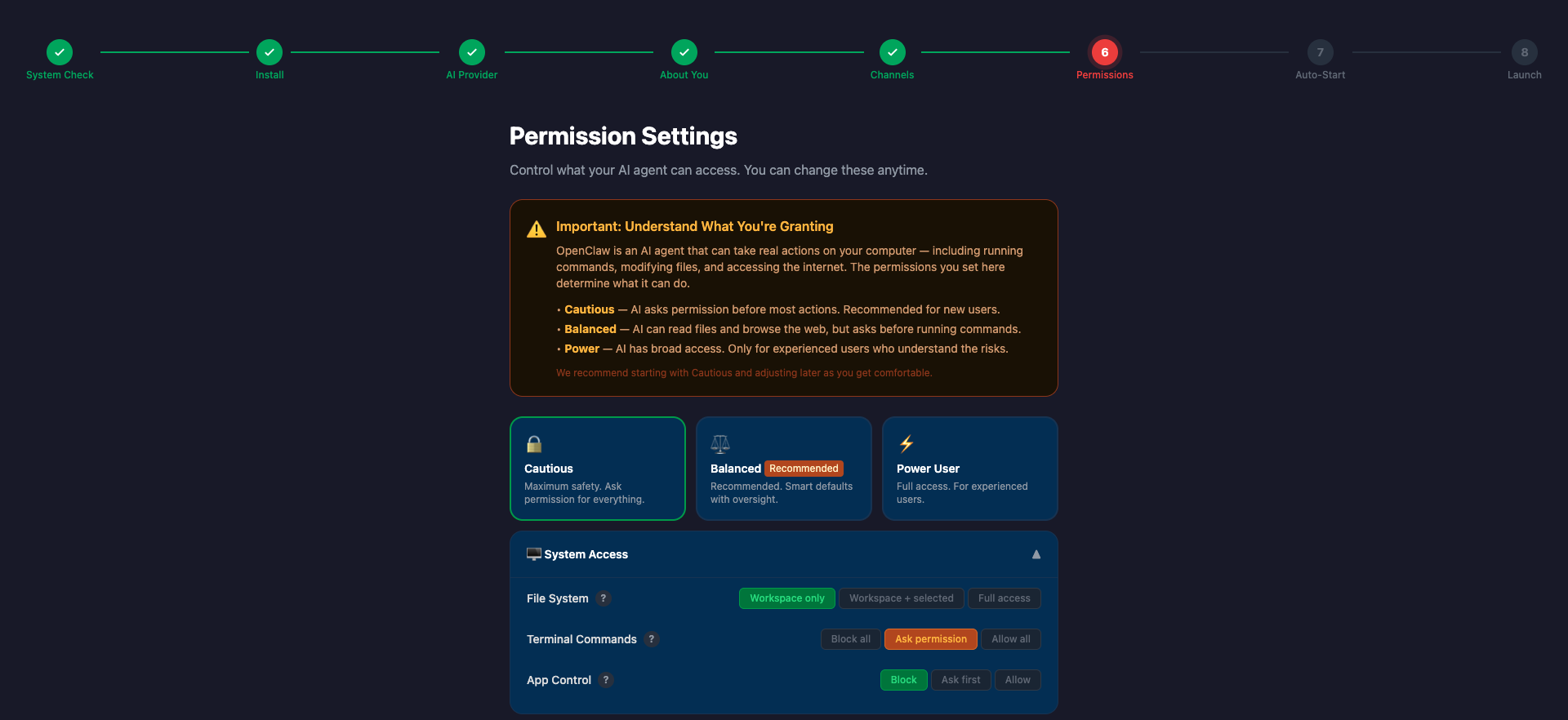
Control exactly what your AI can access. Visual toggles, not YAML files. Three presets for any comfort level.
See your AI's status, spending, and connections at a glance. Auto-refreshing, always current.
Update OpenClaw without touching a command line. Automatic backups and rollback if anything goes wrong.
Changed your mind? One-click removal with optional backup. We make it easy to leave (but you won't want to).

Give your AI a personality. Name it, configure it, make it yours.
Three steps. That's it.
On Mac, drag to Applications. On Windows, run the installer. Takes 30 seconds.
LobsterLauncher checks your system, installs everything needed, and walks you through AI provider setup, messaging channels, and permissions.
Your AI assistant is live. Chat instantly through the built-in webchat — no extra setup needed. Add Telegram, Discord, or iMessage later from your dashboard.
The #1 concern with local AI: "What can it access?" LobsterLauncher answers that with visual permission controls — no YAML, no guesswork.
Read-only access. No file writes, no external calls. Perfect for getting started safely.
Smart defaults for everyday use. File access in approved folders, web search enabled.
Full capabilities for experienced users. All tools enabled. You're in the driver's seat.
Set daily and monthly API spending limits. Get alerts before you hit them. Never get surprised by a massive AI bill again.
Unlike managed AI hosting at $24–50/month, LobsterLauncher is a one-time purchase.
One-time purchase · No subscription
✓ 30-day money-back guarantee. No questions asked.
One license per computer (Mac or Windows). Easy transfer when you upgrade hardware.
Windows Users — Read Before Purchasing
LobsterLauncher uses PowerShell to install and configure OpenClaw on your system. During installation, PowerShell windows will briefly open and close, and Windows SmartScreen may warn about an "unrecognized app" — just click "More info" → "Run anyway." This is normal for new software from independent publishers. If you're not comfortable bypassing these warnings, this app may not be right for you.
Side by side with your other options.
| Feature | LobsterLauncher 🦞 | DIY (Terminal) | Managed Hosting |
|---|---|---|---|
| Setup time | Under 5 min | 2–4 hours | 30 minutes |
| Technical skill needed | None | Advanced | Basic |
| Monthly cost | $0 (one-time $29) | $0 | $24–50/mo |
| Your data | Stays on your computer | Stays on your computer | Cloud servers |
| Permission controls | Visual GUI | Edit YAML | Limited |
| Uninstaller | ✅ One-click | Manual | N/A |
| Works offline | ✅ | ✅ | ❌ |
From non-technical users who just wanted their own AI assistant — without the headaches.
OpenClaw GitHub Stars
Average Setup Time
Money-Back Guarantee
Both Platforms Supported
"I spent 3 hours trying to set up OpenClaw from the terminal. Gave up. Bought LobsterLauncher — was chatting with my AI in 4 minutes. Worth every penny."
Mike R.
Small business owner, Texas
"My dad wanted his own AI but there was no way he was opening Terminal. LobsterLauncher was the perfect gift — he set it up himself and now won't stop talking about 'his assistant.'"
Sarah K.
Software engineer, Oregon
"The permission controls sold me. I wanted a local AI but was nervous about giving it full access. LobsterLauncher's visual toggles let me start cautious and open up as I got comfortable."
David L.
Real estate broker, Colorado
OpenClaw is the most-starred project on GitHub with over 250,000 stars and an active open-source community. LobsterLauncher makes all of that power accessible to everyone — not just developers.
Everything you wanted to know (and then some).

Download LobsterLauncher and be up and running in under 5 minutes.
macOS Ventura+ · Windows 10+ · One-time purchase